Solitaire.com - Classic Cards
- 4.7
- Rating
- 50.00M
- Installs
- Free
- Price
 Analysis by App-foxy
Solitaire.com - Classic Cards is the kind of card game I open when I want something familiar, quiet, and easy to start. It is a free solitaire game for Android, developed by Tripledot Studios Limited, and its main appeal is not novelty but the way a traditional card puzzle fits into small gaps in the day. I can begin a round without learning a complicated system, pause my attention between moves, and return to the same basic rhythm whenever I have a few spare minutes.
What makes this particular game worth considering is its focus on classic solitaire play as a short, repeatable mental break. That sounds simple, but it changes how I use it. I do not approach it like a long campaign or a competitive multiplayer title. I use it as a low-pressure activity for waiting rooms, commutes, quiet evenings, or moments when I want to occupy my hands without committing to a large game. The result is comfortable, though not perfect: its strength is consistency, while its weakness is that players looking for deep variety may eventually find the experience narrow.
Why the classic solitaire format still works
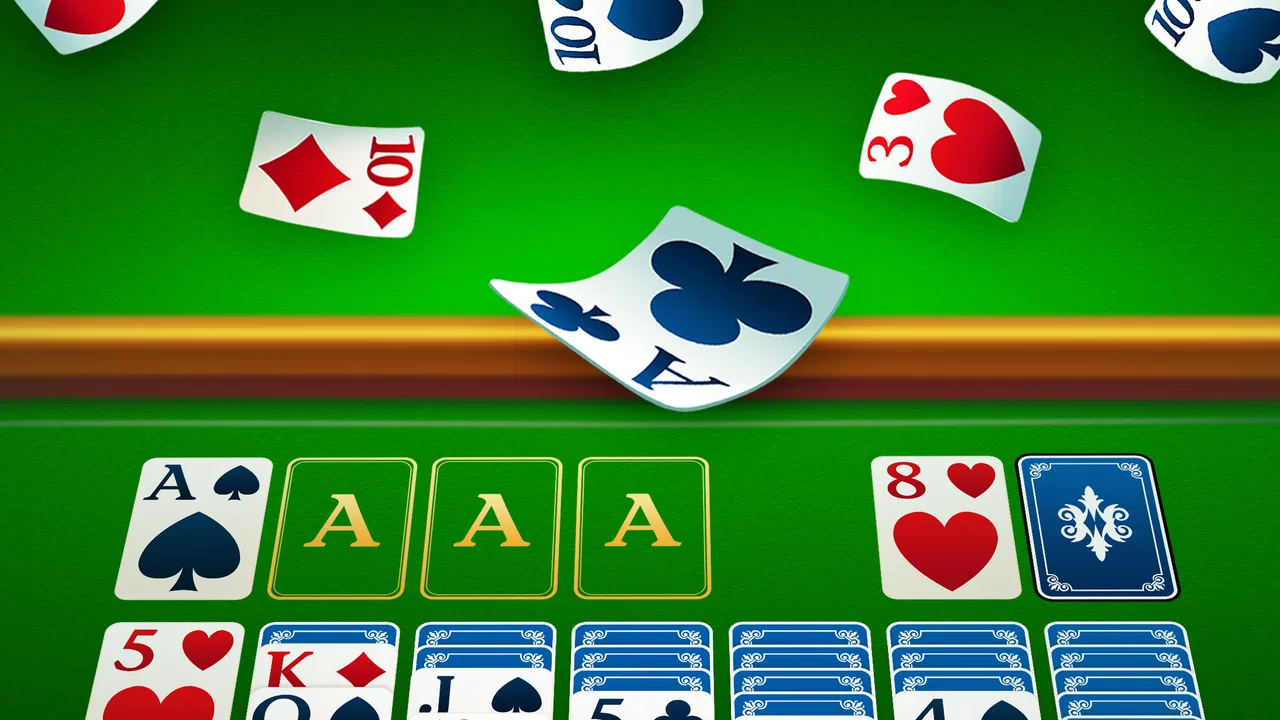
The central capability here is straightforward card play built around the familiar solitaire structure. Cards are arranged on the table, and I work through available moves while trying to organize the deck into the appropriate finishing piles. Because the rules are widely known, the game does not waste time explaining a fictional world, a character system, or a complicated progression path. I can concentrate on the puzzle itself.
You May Also Like

 AccuWeather: Weather Radar
AccuWeather Review: A Quick, Clear Forecast for Everyday Decisions
For everyday plans, the best forecast is the one you can understand quickly. AccuWeather makes rain timing, radar, and local conditions easy to act on, with a few trade-offs.

 Hill Climb Racing
Why Hill Climb Racing Still Turns Crashes Into One More Run
A tiny car, a bumpy hill and one more upgrade: Hill Climb Racing keeps resurfacing because its simple chaos makes every near-miss feel personal.

 AliExpress - Shopping App
AliExpress Makes Global Shopping Feel Personal, but Shoppers Bear the Risk
AliExpress turns a global marketplace into a pocket-sized discovery engine. Its reach is useful, its shopping loop compelling, and its trade-offs easy to miss.

 Lords Mobile: Kingdom Wars
Lords Mobile Is a Kingdom-Building Routine, Not a Quick Match
A case-by-case verdict on the building, battles, device demands, and social commitments that make Lords Mobile rewarding for some players and exhausting for others.

 PDF Scanner app - TapScanner
TapScanner Makes Paperwork Easier to Capture, Check, and Share
TapScanner makes scanning with a phone feel less like a rescue operation and more like a dependable step in getting work done. Its capture tools are useful, though not flawless.

 Block Blast!
 Shows How Much a Puzzle Game Can Leave Out
A quiet grid game shows why puzzle players increasingly value instant clarity, repeatable skill and low-pressure play—and where the genre still needs to catch up.
More From Our News Desk
View All News


That familiarity is especially useful on a phone. Touch controls suit solitaire naturally because the game is based on selecting, moving, and arranging individual cards. A short session feels complete in a way that many mobile games do not. I am not left wondering whether I should spend another half hour to reach a checkpoint or protect progress. I can play a hand, think through a difficult position, and put the phone away.
The store summary presents it as a way to enjoy card games while exercising the mind, and I think that description is best understood as a casual benefit rather than a serious training promise. The game encourages planning, attention, and patience, but I would not choose it as a substitute for a dedicated learning tool. Its value is in giving ordinary concentration a pleasant structure.
In my experience, the most important feature is not a flashy addition but the ability to make a traditional puzzle feel available whenever I need it. That makes the app more useful than its simplicity might suggest. A familiar game can be a good choice when I am tired, because I do not have to spend energy understanding a new ruleset before I can enjoy myself.
What a round feels like in practice
A typical session begins with a quick look at the layout and an attempt to identify moves that open hidden cards or create useful space. I have to decide whether a move helps immediately or merely shifts the problem somewhere else. That small decision-making loop is where the game earns its place on my phone. The cards are simple, but the order of actions matters, and an apparently harmless move can make the remaining layout less flexible.
I find it helpful to treat each hand as a sequence of choices rather than rushing to place every available card. When several moves are possible, I first look for the one that reveals information or frees a column. This approach makes the game feel more thoughtful without turning it into a demanding study exercise. It also reduces the frustration of making a quick move and then realizing that I have blocked a better route.
The touch-based format is naturally more comfortable than trying to play solitaire through a desktop-style interface on a small screen. Cards are the objects I need to manipulate, so the interaction feels direct. Still, phone screens vary, and anyone with a smaller display may need to pay closer attention when several cards overlap. That is not a deal-breaker for me, but it is one reason I prefer playing at a relaxed pace rather than tapping rapidly.
The current version is 4.60.00, and the game supports devices running Android 6.0 or later. That broad compatibility makes it practical for people who keep an older phone for simple games. I would still check the app’s device requirements before installing on a particularly old handset, but the stated minimum system version is not demanding by modern Android standards.
A useful routine for better decisions
One of the less obvious ways to enjoy this game is to create a small decision routine. I begin by checking whether any move exposes a face-down card, then consider whether a vacant column can be used strategically, and only after that make less urgent rearrangements. This is not a hidden mode or a special feature; it is a way of getting more value from the same layout. The routine turns idle tapping into a calmer puzzle-solving habit.
Another useful habit is to avoid treating every available move as equally good. Moving a card because it can be moved is not always progress. Sometimes preserving a sequence gives me more options than immediately transferring it. When I play this way, the game becomes less about speed and more about managing future choices. That is where its modest mental challenge feels most genuine.
I also recommend stopping after a frustrating hand instead of repeatedly forcing the next move. Solitaire is a poor choice for angry, impatient play because the temptation to tap quickly can make the layout harder to read. A short break often makes the next session feel more enjoyable. For me, this is one reason the app works well as a reset between tasks rather than as a game I play continuously for hours.
The best everyday scenario
The strongest use case is a short waiting period when I want something more engaging than scrolling but less demanding than a full game. Imagine arriving early for an appointment with ten quiet minutes available. I can open the app, play at my own pace, and stop when I am called. There is no need to coordinate with another player, remember a story, or worry that leaving suddenly will disappoint a team.
The same pattern works during a commute when I am seated and have enough attention for a puzzle. I would not use it while walking, cycling, or doing anything that requires awareness of my surroundings. The game is simple, but it still asks me to look at the screen and make decisions. Used responsibly, it fills an awkward pause without demanding a large block of free time.
At home, I find it most suitable at the end of the day when I want a quiet activity. The recognizable rules make it easier to settle in than a new strategy game, and individual hands provide natural stopping points. It can also suit someone who enjoys card puzzles but does not want the social pressure of online matches or the complexity of collectible-card games.
For a family device, the Everyone content rating is reassuring in a basic sense: the game is positioned for a general audience rather than a mature one. That does not mean every child will find solitaire entertaining, of course. Younger players may need help with the rules, while older children can use it as a gentle introduction to planning and sequencing. I would describe it as accessible, not automatically compelling for every age group.
Where it differs from other card-game choices
Compared with a physical deck of cards, the app is more convenient because the layout is prepared on the screen and the cards cannot be accidentally knocked over. A real deck offers a tactile quality that a phone cannot reproduce, and it avoids screen fatigue. I would choose physical cards for a relaxed table session with another person, but I would choose this app when I am alone and want to start immediately.
Compared with competitive card games, this solitaire experience is much less stressful. There is no opponent waiting for my move, no need to build a collection, and no reason to study a changing metagame. That simplicity is a major advantage for casual players. The trade-off is that it lacks the social tension and long-term strategic variety that make multiplayer card games exciting.
Compared with puzzle games built around matching, physics, or elaborate levels, classic solitaire feels slower and more deliberate. It does not constantly introduce new rules to keep surprising me. Some players will see that as relaxing; others may interpret it as repetitive. I think the right comparison is not “which game has more content?” but “what kind of attention do I want to give?” This app is better when I want a steady, recognizable challenge.
It is also different from a dedicated brain-training app. Solitaire can encourage planning and focus, but its purpose is entertainment first. If I wanted structured exercises, progress reports, or a broad collection of cognitive tasks, I would look elsewhere. Here, the mental benefit comes naturally from trying to solve the current hand, not from following a formal training program.
The trade-offs I noticed
The biggest limitation is the same quality that makes the game approachable: the core experience is familiar. If I already play solitaire regularly and expect constant novelty, this version may not hold my attention indefinitely. It is easy to imagine enjoying several short sessions and then wanting a different kind of challenge. That is not a flaw in the basic format, but it matters when deciding whether this should be a main game or a small utility for spare moments.
There is also a difference between wanting a relaxing puzzle and wanting a game with a strong sense of progression. This app suits the first goal better. Players who need character development, unlockable worlds, competitive rankings, or a story may feel that a card layout alone is not enough. I would skip it if my ideal mobile game needs a persistent adventure or a social community.
Another trade-off is attention. Solitaire looks passive, but a difficult hand can require sustained concentration. That is useful when I want to focus, yet inconvenient if I only have a few seconds or if I am multitasking. I would not open it while listening closely to a conversation or handling another responsibility. The best sessions are short but intentional.
Because the game is free, it is easy to try without making a purchase decision first. That lowers the barrier for someone who simply wants to see whether digital solitaire feels comfortable. At the same time, free mobile games can vary in how they handle interruptions and optional commercial elements. I prefer to approach any free game with realistic expectations: convenience comes first, and the experience may not feel as distraction-free as a physical deck.
That trade-off is especially relevant for people who are sensitive to interruptions. If I want a completely quiet card session with no digital distractions, a standard deck remains the cleaner option. If I want automatic setup, portability, and a game that is always ready, the app is more practical. The better choice depends on whether convenience or atmosphere matters more at that moment.
Who will get the most from it
I think the ideal player is someone who already likes classic solitaire or wants a low-pressure introduction to card puzzles. The game is easy to understand, works well in brief sessions, and does not require a large investment of time before it becomes enjoyable. It is also a good fit for people who prefer solo activities and want something more mentally active than watching short videos.
It may appeal to older Android users as well, since the minimum operating-system requirement reaches back to Android 6.0. The broad device support is useful for a straightforward game whose main job is to load quickly and remain playable on a phone that is not new. I would not buy a new device for it, but I appreciate that the app is not aimed only at the latest hardware.
Tripledot Studios Limited has built a product with a clear identity: a familiar card game presented for convenient mobile play. Its audience is reflected in its reach, with more than ten million installs and an average rating of 4.8 from roughly three hundred twenty thousand ratings. Those figures do not guarantee that every player will enjoy it, but they do suggest that the basic format works for a large number of people. The store also shows around sixty-two thousand written reviews, which reinforces that this is an established choice rather than an obscure experiment.
I would be more cautious about recommending it to someone who dislikes repetition or expects every session to introduce something new. I would also point competitive players toward a multiplayer-focused card title instead, and I would point serious puzzle enthusiasts toward games with more varied mechanics. Solitaire.com - Classic Cards is strongest when the goal is dependable, familiar play rather than constant escalation.
My final take after using it as a daily time-filler
After treating it as a small part of my routine, I came away with a positive but measured opinion. The app does not need to reinvent solitaire to be useful. Its value comes from making a well-known card puzzle easy to pick up, easy to pause, and comfortable to revisit. I especially like it for waiting periods and quiet evenings, when I want a little structure without the pressure of a larger game.
The most effective way to use it is to slow down, look for moves that reveal information, and regard each hand as a compact planning exercise. That approach gives the classic format more depth than hurried tapping, while still keeping the experience accessible. It also helps avoid the main frustration: turning a relaxing puzzle into a race against my own impatience.
My recommendation is therefore simple. If you want a free, general-audience card game for solo sessions and already enjoy the familiar solitaire formula, this is an easy one to try. If you need multiplayer competition, a rich progression system, or a large variety of puzzle mechanics, choose a different category of game. For everyone in between, the app works best as a dependable pocket-sized pause: not an ambitious adventure, but a polished way to give a few spare minutes a little focus.
FAQs for Solitaire.com - Classic Cards
01What platforms is Solitaire.com available on?
Solitaire.com - Classic Cards is available for both Android and iOS platforms. You can download it from the Google Play Store for Android devices and the Apple App Store for iOS devices. The app is designed to provide a seamless experience across different devices, ensuring you can play your favorite card game anywhere.
02Does Solitaire.com - Classic Cards require an internet connection?
No, Solitaire.com - Classic Cards can be played offline. This means you can enjoy the game without needing an active internet connection, making it perfect for use during commutes or in areas with limited connectivity. However, some features might require internet access, such as updates or online leaderboards.
03Are there any in-app purchases in Solitaire.com?
Yes, Solitaire.com - Classic Cards offers in-app purchases. These typically include options to remove ads, access premium card designs, or unlock additional game modes. While the core game is free to play, these purchases can enhance your experience by providing more customization and an ad-free environment.
04Is the game suitable for children?
Solitaire.com - Classic Cards is generally suitable for players of all ages, including children. The game involves strategy and concentration, which can be beneficial for cognitive development. However, it’s important for parents to be aware of the in-app purchase options and supervise their children's gameplay to manage spending.
05How customizable is the Solitaire.com - Classic Cards app?
The app offers a variety of customization options to enhance your gaming experience. You can choose from different card designs, backgrounds, and themes to personalize the appearance. Additionally, the app provides various game modes and difficulty levels, allowing you to tailor the gameplay to your preferences and skill level.
Pros
- Simple and intuitive interface.
- No internet required to play.
- Customizable card decks.
- Daily challenges for rewards.
- Smooth animations and graphics.
Cons
- Ads can be intrusive.
- Limited game modes available.
- No multiplayer feature.
- Occasional in-app purchases.
- Not suitable for older devices.

Solitaire.com - Classic Cards
Gallery